
Go Back   Java Programming Forums > Learning Java > Java Code Snippets and Tutorials

Reply
 
LinkBack Thread Tools Display Modes
  #1 (permalink)  
Old 06-06-2008, 03:06 PM
JavaPF's Avatar
mmm.. coffee
 
5 Highscores

Join Date: May 2008
Location: United Kingdom
Posts: 1,211
Thanks: 61
Thanked 66 Times in 64 Posts
JavaPF is someone you want to know!JavaPF is someone you want to know!JavaPF is someone you want to know!

I'm feeling Inspired
Post How to Sendkeys to an application in Java using the Robot Class

For any of you that have used Visual Basic, you will probably know about SendKeys.
SendKeys is basically a way of sending keystrokes to an application.

Java now has this ability thanks to the Robot Class.

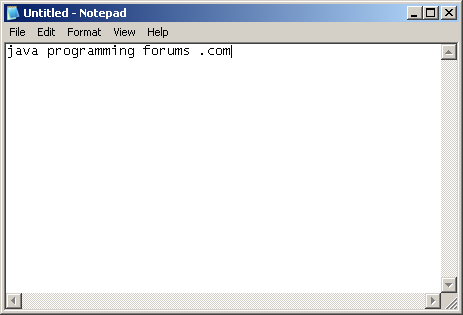
This code will show you how to send keystrokes to an application. In this case, Notepad.exe with a delay between each key.

The Robot class can do a lot more so its worth looking into!

Java Code
import java.awt.*;
import java.awt.event.*;
import java.io.IOException;
 
public class Robot1{
 
    static int keyInput[] = 
    {
      KeyEvent.VK_J, KeyEvent.VK_A, KeyEvent.VK_V, KeyEvent.VK_A, KeyEvent.VK_SPACE,
      KeyEvent.VK_P, KeyEvent.VK_R, KeyEvent.VK_O, KeyEvent.VK_G, KeyEvent.VK_R,
      KeyEvent.VK_A, KeyEvent.VK_M, KeyEvent.VK_M, KeyEvent.VK_I, KeyEvent.VK_N,
      KeyEvent.VK_G, KeyEvent.VK_SPACE, KeyEvent.VK_F, KeyEvent.VK_O, KeyEvent.VK_R,
      KeyEvent.VK_U, KeyEvent.VK_M, KeyEvent.VK_S, KeyEvent.VK_SPACE, KeyEvent.VK_PERIOD,
      KeyEvent.VK_C, KeyEvent.VK_O, KeyEvent.VK_M 
    };
 
 
    public static void main(String[] args) throws AWTException,IOException {
 
    Runtime.getRuntime().exec("notepad");
 
    Robot robot = new Robot();
 
    for (int i = 0; i < keyInput.length; i++)
    {
 
      robot.keyPress(keyInput[i]);
      robot.delay(100);
 
    }
}
}
Output:


Try it for yourself. Its cool...


__________________
Don't forget to add code tags around your code:

Forum Tip: Add to peoples reputation () by clicking the button on their useful posts.
Reply With Quote Share this thread on Facebook
The Following 2 Users Say Thank You to JavaPF For This Useful Post:
bocahTuaNakalzz (25-10-2009), JFujy (22-09-2009)
Sponsored Links
  #2 (permalink)  
Old 25-05-2009, 07:35 PM
Jay Jay is offline
Junior Member
 

Join Date: May 2009
Posts: 4
Thanks: 0
Thanked 0 Times in 0 Posts
Jay is on a distinguished road
Default Re: How to Sendkeys to an application in Java using the Robot Class

wow, does the Robot do everything short of key logging and injecting DLL's into executables?
hahaha
Reply With Quote
  #3 (permalink)  
Old 23-08-2009, 03:46 PM
Junior Member
 

Join Date: Aug 2009
Posts: 3
Thanks: 0
Thanked 0 Times in 0 Posts
JSoFt is on a distinguished road
Default Re: How to Sendkeys to an application in Java using the Robot Class

ei this is one is cool ,

anyway sir java , what other kind of executable file can i use with this method..?

in a console output.. how should i code it?
Reply With Quote
  #4 (permalink)  
Old 23-08-2009, 05:23 PM
Freaky Chris's Avatar
Senile Half-Wit
 
8 Highscores

Join Date: Mar 2009
Location: UK
Posts: 530
Thanks: 2
Thanked 60 Times in 56 Posts
Freaky Chris will become famous soon enoughFreaky Chris will become famous soon enough

I'm feeling Mellow
Default Re: How to Sendkeys to an application in Java using the Robot Class

SendKeys passes the keys to the currently active window and then they are proccessed as if the user typed them. So you can send them to any application, and you can change focuses too.

Chris
__________________
chris[at]javaprogrammingforums[dot]com

University of Wales, Bangor
Reply With Quote
  #5 (permalink)  
Old 25-10-2009, 04:40 AM
Junior Member
 

Join Date: Sep 2009
Posts: 7
Thanks: 2
Thanked 0 Times in 0 Posts
bocahTuaNakalzz is on a distinguished road
Default Re: How to Sendkeys to an application in Java using the Robot Class

Wow... Robot Class.....
Reply With Quote
Reply

Tags
robot class, send keys

Thread Tools
Display Modes

Posting Rules
You may not post new threads
You may not post replies
You may not post attachments
You may not edit your posts

BB code is On
Smilies are On
[IMG] code is On
HTML code is Off
Trackbacks are On
Pingbacks are On
Refbacks are On


Similar Threads
Thread Thread Starter Forum Replies Last Post
How to Add a JMenu toolbar to a Java Swing application JavaPF Java Code Snippets and Tutorials 2 04-05-2009 02:56 PM
[SOLVED] JAVA Calling Class tazjaime What's Wrong With My Code? 4 23-04-2009 02:31 PM
Beginners Eclipse Tutorial. How to run your first Eclipse Java Application. JavaPF Java Code Snippets and Tutorials 3 12-03-2009 10:07 AM
How to Control your computers mouse using the Robot Class JavaPF Java Code Snippets and Tutorials 3 11-02-2009 09:17 PM
How to Sort an Array using the java.util.Arrays class JavaPF Java Code Snippets and Tutorials 0 01-12-2008 02:02 PM


100 most searched terms
Search Cloud
2 dimensional arraylist java 2d arraylist java actionlistener actionlistener in java actionlistener java actionlistener jbutton addactionlistener addactionlistener java avatar hardware id convert double to integer java double format java double to int java double to integer in java double to integer java eclipse shortcut keys eclipse tutorial for beginners exception in thread "awt-eventqueue-0" java.lang.outofmemoryerror: java heap space exception in thread "main" java.lang.outofmemoryerror: java heap space format double java get mouse position java hardware id avatar java 2 dimensional arraylist java 2d arraylist java actionlistener java addactionlistener java button actionlistener java convert double to int java double format java double to int java double to integer java for beginner eclippse java format double java forum java forums java get mouse position java ipod touch java jbutton java list to map java mouse position java programming forum java programming forums java sendkeys java.lang.reflect.invocationtargetexception java.util.arraylist jbutton actionlistener jbutton java programming forums string to int java two dimensional arraylist java writing apps for ipod touch

All times are GMT. The time now is 09:19 PM.
Powered by vBulletin® Copyright ©2000-2009, Jelsoft Enterprises Ltd.