|
||
|
||||
|
About XMPP
The Extensible Messaging and Presence Protocol (XMPP) is an open technology for real-time communication, which powers a wide range of applications including instant messaging, presence, multi-party chat, voice and video calls, collaboration, lightweight middleware, content syndication, and generalized routing of XML data. All offices now days use some kind of instant messaging system to keep in contact with members of staff & clients. In our Office we use Jabber & Pidgin. Quote:
To begin, download the Smack API from here: Ignite Realtime: Smack API Once you have the Smack API downloaded to your computer. Extract all the .jar files. You now need to include these jar files into your project. If you use Eclipse you can follow these instructions: Right click your project > Properties > Java Build Path > Add External Jars. Now we have the Smack API included within our project, we can start to use the API. Create a new class called JabberSmackAPI and add the below code. Make sure you update the parts in bold. Java Code
import java.util.*;
import java.io.*;
import org.jivesoftware.smack.Chat;
import org.jivesoftware.smack.ConnectionConfiguration;
import org.jivesoftware.smack.MessageListener;
import org.jivesoftware.smack.Roster;
import org.jivesoftware.smack.RosterEntry;
import org.jivesoftware.smack.XMPPConnection;
import org.jivesoftware.smack.XMPPException;
import org.jivesoftware.smack.packet.Message;
public class JabberSmackAPI implements MessageListener{
XMPPConnection connection;
public void login(String userName, String password) throws XMPPException
{
ConnectionConfiguration config = new ConnectionConfiguration("im.server.here", 5222, "Work");
connection = new XMPPConnection(config);
connection.connect();
connection.login(userName, password);
}
public void sendMessage(String message, String to) throws XMPPException
{
Chat chat = connection.getChatManager().createChat(to, this);
chat.sendMessage(message);
}
public void displayBuddyList()
{
Roster roster = connection.getRoster();
Collection<RosterEntry> entries = roster.getEntries();
System.out.println("\n\n" + entries.size() + " buddy(ies):");
for(RosterEntry r:entries)
{
System.out.println(r.getUser());
}
}
public void disconnect()
{
connection.disconnect();
}
public void processMessage(Chat chat, Message message)
{
if(message.getType() == Message.Type.chat)
System.out.println(chat.getParticipant() + " says: " + message.getBody());
}
public static void main(String args[]) throws XMPPException, IOException
{
// declare variables
JabberSmackAPI c = new JabberSmackAPI();
BufferedReader br = new BufferedReader(new InputStreamReader(System.in));
String msg;
// turn on the enhanced debugger
XMPPConnection.DEBUG_ENABLED = true;
// Enter your login information here
c.login("username", "password");
c.displayBuddyList();
System.out.println("-----");
System.out.println("Who do you want to talk to? - Type contacts full email address:");
String talkTo = br.readLine();
System.out.println("-----");
System.out.println("All messages will be sent to " + talkTo);
System.out.println("Enter your message in the console:");
System.out.println("-----\n");
while( !(msg=br.readLine()).equals("bye"))
{
c.sendMessage(msg, talkTo);
}
c.disconnect();
System.exit(0);
}
}

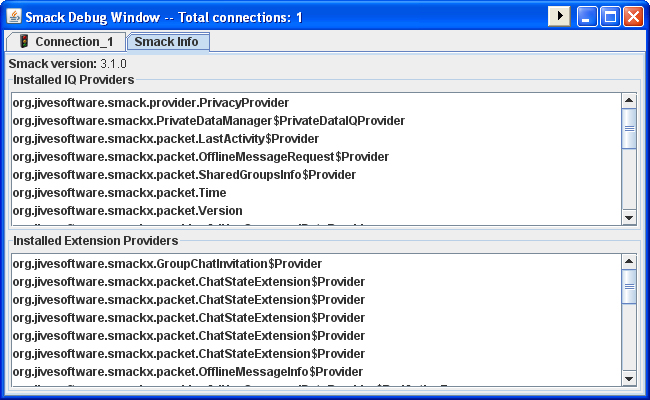
![]() For more information on what this does and how to use it, see: Smack: Debugging - Jive Software The code will then print a list of available contacts. You can select who to talk to and start sending messages to that person. Here is an example console output: Quote:
For help and a more in depth explanation, see the documentation that comes with the Smack API.
__________________
Don't forget to add code tags around your code: ![]() Forum Tip: Add to peoples reputation ( ) by clicking the button on their useful posts.
|
|
|||
|
hello ,
i am using netbeans 6.5.1 and i have added smack.jar smackx.jar smackx-debug.jar smackx-jingle.jar to my project and tried to compile your code i am getting class not found error in the line below Quote:
|
|
||||
|
Hello osmankamil, welcome to the forums.
Sorry, that error was my fault. Java Code
JabberSmack c = new JabberSmack(); Java Code
JabberSmackAPI c = new JabberSmackAPI();
__________________
Don't forget to add code tags around your code: ![]() Forum Tip: Add to peoples reputation ( ) by clicking the button on their useful posts.
|
| The Following User Says Thank You to JavaPF For This Useful Post: | ||
osmankamil (18-06-2009) | ||
|
|||
|
I have easily created 2 users with openfire.
I am using pidgin as one of my clients and your example code for the other client. My question is about the way XMPP works , should i get permission from a client to be added to his/her list ? Because i can not send any messages to my account which is logged in from pidgin even it looks online when i check from openfire admin console. I tried using two pidgin softwares , and tried to add each other as buddies. But no request was sent from one to another. However if i make both my account to join a chat room . They can see and talk to each other. Any help would be appriciated. Thanks |
|
||||
|
Hello osmankamil.
To be honest, I am not all that familiar with XMPP. We use Pidgin here at work but I am not responsible for creating or managing accounts. I started messing around with the Java Smack API because someone else here was working on a PHP version. I know the client does work because I have used it to send messages to another Pidgin user who was already on my list. I haven't adding a new user myself. I'm thinking this problem could be because you are running 2 clients on the same PC? Have you tried messaging the Pidgin client on another machine?
__________________
Don't forget to add code tags around your code: ![]() Forum Tip: Add to peoples reputation ( ) by clicking the button on their useful posts.
|
|
|||
|
I tried running the sample above with openfire installed in the same machine but I got this result...
Quote:
http://<computer_id>:9090 https://<computer_id>:9091 I tried using the address, 127.0.0.1 and localhost but all return errors... I am not sure what went wrong... Last edited by jch02140; 19-01-2010 at 07:03 AM. |
![]() |
| Tags |
| jabber, smack api, xmpp |
| Thread Tools | |
| Display Modes | |
|
|
Similar Threads
|
||||
| Thread | Thread Starter | Forum | Replies | Last Post |
| [SOLVED] web client | 5723 | File I/O & Other I/O Streams | 8 | 10-06-2009 09:44 PM |
| [SOLVED] simple change to a boolean value in a method call help... | rptech | Object Oriented Programming | 3 | 20-05-2009 10:48 AM |
| Yo! Stuck making a simple game | rojroj | Java Theory & Questions | 3 | 02-04-2009 03:24 PM |
| Looking for a programmer to make a simple program. | GrosslyMisinformed | Paid Java Projects | 3 | 27-01-2009 08:33 PM |
| How to write a file using Java | JavaPF | Java Code Snippets and Tutorials | 0 | 13-08-2008 11:45 AM |